- Daily AI Edge
- Posts
- 🩺 ChatGPT Becomes a Health Companion
🩺 ChatGPT Becomes a Health Companion
+ Track Email Expenses With Claude 🤖

Leo Grundström
January 9th, 2026
In partnership with

Today’s menu 🍽️👇️
Length: 5 minutes ⏰
ChatGPT Becomes a Health Companion 🩺
Gemini Turns Class Lessons Into Podcasts 🎙️
Microsoft Adds Shopping to Copilot 💳
Ford’s In-Car AI Assistant Is Coming 🤖
Claude Automates Email Expenses 💸
Prompt of the week 💬
Top AI tools of the week ⚒️
Tech moves fast, but you're still playing catch-up?
That's exactly why 100K+ engineers working at Google, Meta, and Apple read The Code twice a week.
Here's what you get:
Curated tech news that shapes your career - Filtered from thousands of sources so you know what's coming 6 months early.
Practical resources you can use immediately - Real tutorials and tools that solve actual engineering problems.
Research papers and insights decoded - We break down complex tech so you understand what matters.
All delivered twice a week in just 2 short emails.
FRESH AI NEWS
OpenAI Turns ChatGPT Into a Health Tool 🩺
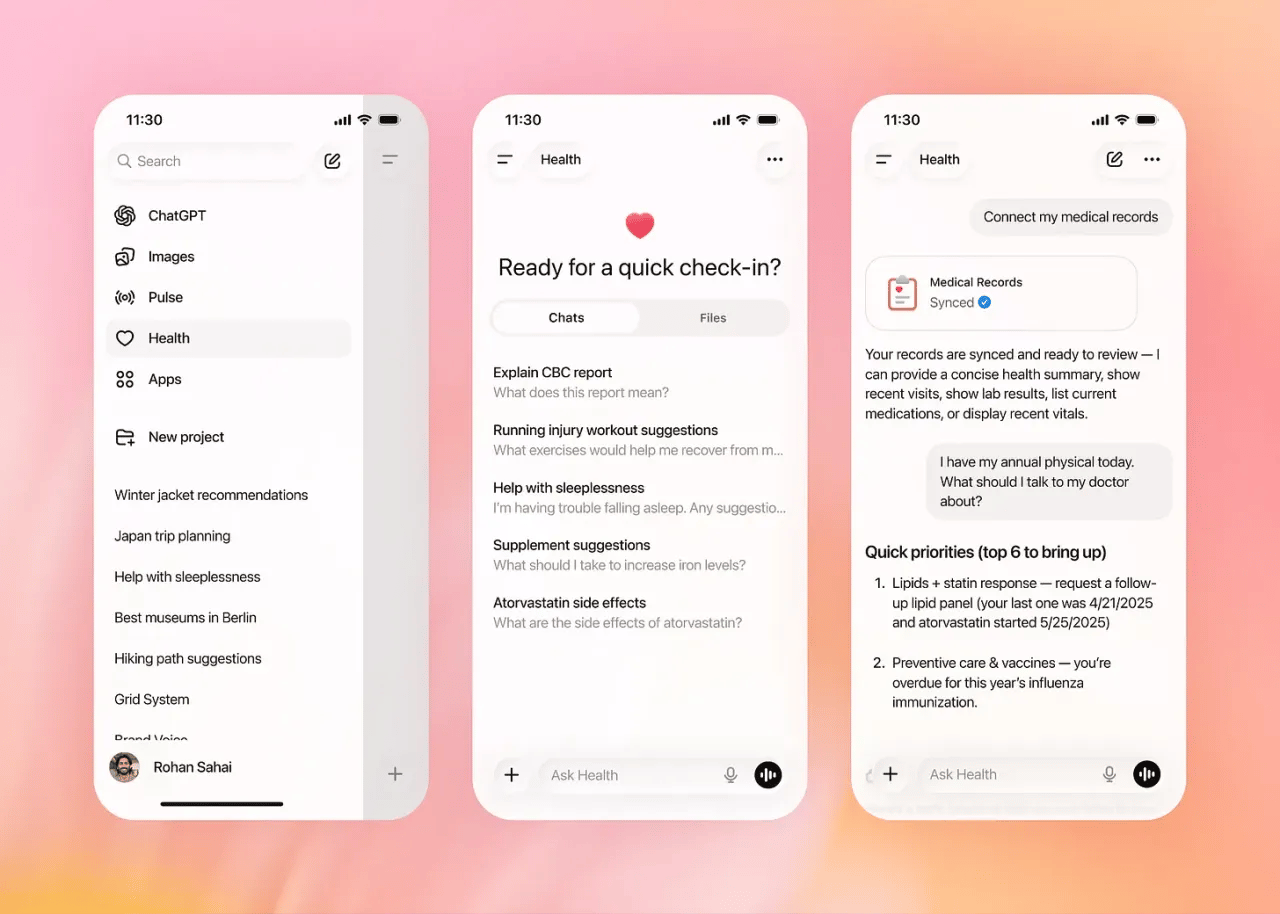
OpenAI launched ChatGPT Health for secure health and wellness queries, following over 230 million weekly inquiries🩺
ChatGPT Health is a separate health-focused space where users can discuss wellness, medical queries, and healthcare planning 🏥
According to OpenAI, 230 million people use ChatGPT each week to ask health and wellness questions, making it one of the most popular uses for the platform 📊
Users can securely connect medical records and wellness apps like Apple Health or MyFitnessPal for more personalized responses 🧬
Health chats are isolated from regular conversations, with encryption and data protections; they don’t feed back into general model training 🔐
Initially available via waitlist to Free, Go, Plus, and Pro users (outside Europe/UK), with broader web and iOS access coming soon 📅
OpenAI is designed to provide information and help, not to diagnose health issues or take the place of doctors ⚖️
Why You Should Care: ChatGPT Health advances health-focused AI by assisting with symptoms, treatments, insurance, and wellness, while raising privacy, safety, and reliability concerns in a regulated field.
Google Classroom Adds AI Podcast Tool 🤖
Google introduced a Classroom feature using Gemini AI to convert lesson content into podcast-style audio episodes, simplifying audio lesson delivery for teachers 🎙️
Teachers can click “Convert to Podcast” and Gemini will read textbooks, slides, or notes into clear, natural-sounding audio 🎧
Educators can preview and edit the generated transcript before creating the final audio episode 🔄
Compatible with slides, documents, and uploaded PDFs, making Classroom more accessible 🗂️
The tool is built into Google Classroom, so you don't need any extra apps 📍
Students can access episodes in Classroom or download them for offline listening 🤝
Supports multiple languages and accents to better match diverse classrooms 🌐
Why You Should Care: This changes lesson materials into audio content that students can listen to anywhere, helping those who learn better by listening and making it easier for students with reading difficulties. It also allows teachers to reach more students at any time.
Copilot Turns Into a Shopping Assistant 🛒
Microsoft is launching Copilot Checkout, allowing users to buy products directly via Buy buttons and in-chat shopping within the Copilot AI chat interface 🛍️
When you ask Copilot for product suggestions (e.g., shoes, lamps), the interface now shows “Details” and “Buy” options right in the chat. Choosing “Buy” opens a checkout flow inside Copilot 🛒
Users can enter their shipping and payment information directly in the Copilot window, without needing to go to another retailer's site 💸
he feature is rolling out in the U.S. with partners like Urban Outfitters, Anthropologie, Ashley Furniture, Etsy sellers, and payment support from PayPal, Stripe, and Shopify 🤝
Launching primarily on Copilot.com for now, with expansion likely across Copilot surfaces like Bing and Microsoft products 📍
Microsoft stock dipped slightly after the news, as analysts watch how Copilot Checkout might impact margins and partnerships 📉
Why You Should Care: Integrating direct shopping into Copilot turns it into a comprehensive commerce interface, allowing product discovery and purchase within the app. This enhances AI-driven retail by merging search, conversation, and shopping, boosting Microsoft's position in the AI e-commerce race.
Ford Adds AI Voice, Eyes L3 Driving 🧠

At CES 2026, Ford revealed it will launch an AI-powered voice assistant in 2026 (app first, then in-car), and is targeting Level 3 autonomous, hands-off/eyes-off driving for 2028 on its next EV platform 🚗
Ford's AI assistant, understanding vehicle context and natural language, will launch on Ford/Lincoln apps in 2026 and in vehicles in 2027 🗣️
Instead of generic voice commands, the assistant can tap vehicle-specific data (e.g., cargo capacity, remaining oil life) for tailored answers 📱
Built on Google Cloud and external large-language models, the system connects deeply with a vehicle’s telemetry and configurations 🧠
By 2028, Ford will launch a Level 3 hands-free driver-assist system on select highways, enhancing autonomous driving 🚘
The new autonomous suite builds on BlueCruise and aims to lower costs while boosting capability compared with current systems ⚙️
Why You Should Care: Ford is integrating AI into vehicles to enhance driving experiences and move toward hands-off autonomy, with a phased rollout from app to in-car to Level 3 driving, potentially transforming highway travel by the decade's end.
AUTO TRACK EXPENSES
Track Email Expenses With Claude 🤖

Discover how to use Claude for Chrome to automatically track your expenses by turning your Gmail inbox into a live expense log. It pulls payment details and records them in Google Sheets, all without needing Zapier or scripts ✅
Here’s how to get started 👇️
Set up your workspace by installing the Claude Chrome extension and creating a new Google Sheet with columns like Vendor, Description, Cost, Billing Date, Payment Cycle, and Notes. Keep the sheet URL handy
Activate Claude in-browser by opening Gmail in a Chrome tab, clicking Extensions → Claude, and confirming Gmail is the active context Claude can read and act on.
Give Claude an action-oriented instruction, for example:
“Scan my emails from [specific date range] for receipts or subscription confirmations. Extract vendor name, charge amount, and billing date, then log everything into this Google Sheet: [paste link]. Add a final row calculating total spend.”
Allow Claude to handle the inbox. If it stops because there are too many messages, just tell it to start again. You can save this process as a shortcut by using / → “Save as shortcut” so you can use it easily next time.

Pro Tip: Use different shortcuts for various needs, like monthly subscriptions, one-time purchases, or reimbursements. This way, you can quickly create clear reports without having to ask again each time ✨
The best place on the Internet to learn about AI! 🌐 🤖

I just started my own X page where I provide AI news, guides, hacks and more (for FREE)!
We don’t miss a day, that means you get the most recent AI news, practical workflows, expert guides and premium content everyday.
TOOLS OF THE WEEK
These AI tools are going VIRAL 🐝
GLM-4.7 - Z.ai's new SOTA open-source model 🤖
SAM Audio - Meta’s model to separate sounds using text prompts 🚀
GPT 5.2 Pro - OpenAI’s most advanced frontier model 🧮
Grok Imagine - xAI's image and video generation platform 🌌
Warm regards,
Leo Grundström / Founder of Daily AI Edge
Reply